

Unlike Google Analytics — which provides “anonymous” visitor data — tools like Leadfeeder and Leadberry are designed to capture the names of companies and individuals who visit your site.
Both platforms integrate with your existing Google Analytics to capture and display the information you need to follow up with visitors to your site.
I signed up and tried both Leadfeeder and Leadberry to get a sense of how they worked.
Below, I’ve compared them across five categories:
- Usability
- Integrations
- Features
- Support
- Data quality.
Use this information to compare their offerings and determine what’s most useful to you.
1. Usability
Leadfeeder: 10/10; Leadberry: 7/10
When I signed up for Leadfeeder, I was greeted by a cheerful explanation video for the basic layout of their site. It gave a quick, clean overview for features that were — honestly — intuitive already.
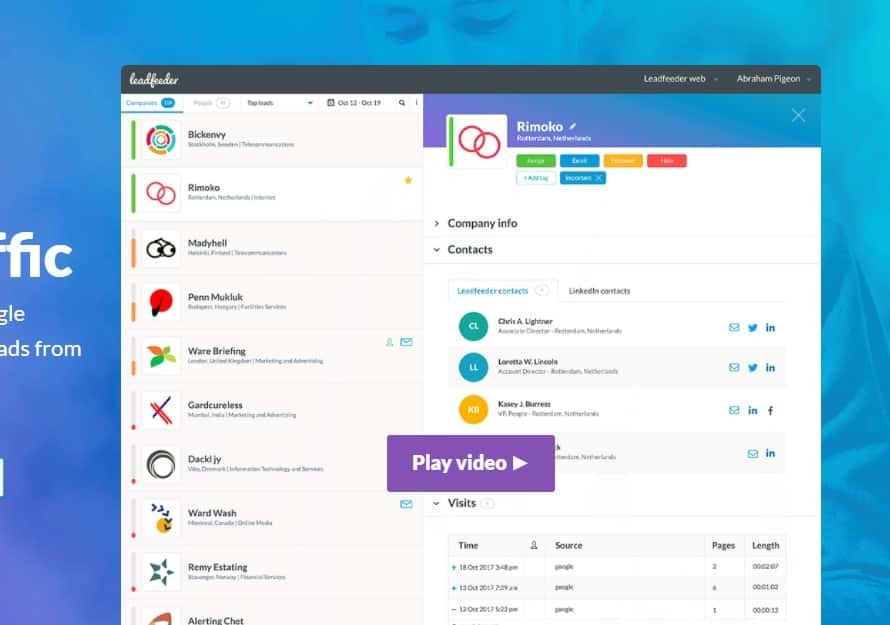
On the left, I have access to a list of companies that might interest me. Clicking on them expands detailed info about each visiting company, including potential contacts. Setting up custom filters based on things like industry, location, and page visits couldn’t have been more straightforward.
I like the balance on the Leadfeeder pages — it’s not crowded, but everything I want to know is easy to find.
Leadberry’s page is functional — but messy. Websites are displayed in a list on the left and unique visitors are listed on the main display.
Clicking a visitor profile hides everything else while you scroll to find the information you want.
Creating & saving custom filters was still intuitive, but there were fewer options: only 7 categories compared to the 29 offered by Leadfeeder.
In addition, Leadberry’s integration options were buried in its settings menu.
Leadfeeder prompts integrations on the home page. You can complete them immediately or close the prompt to complete them later.
Overall, Leadberry required a little more digging to get up and running.
2. Integrations
Leadfeeder: 8/10; Leadberry: 7/10
Leadfeeder integrates with five CRM platforms: Salesforce, Microsoft Dynamics, webCRM, Pipedrive, and Zoho. As a bonus, it also integrates with Mailchimp.
I love that the Mailchimp integration enhances learnings from sales emails. Leadfeeder does a fantastic job of tracking which email resulted in which clicks on your website. You can follow a customer through the entire process of opening an email, clicking a link, and exploring your site.
Leveraging that pathway is a great way for sales reps to focus on each individual’s concerns and interests.
Leadberry integrates directly with Pipedrive, Insightly, SalesFlare, Zoho, and Slack. According to their website, more integrations are coming soon, but it leaves out a number of popular CRMs I would expect (like Salesforce).
In addition, Leadfeeder has a public API that can be used for companies that need more customization than traditional API integrations.
This makes Leadfeeder an ideal choice if you want to do any customization to get your lead data.
3. Features
Leadfeeder: 9/10; Leadberry: 4/10
Both Leadberry and Leadfeeder offer seamless integration with Google Analytics so you can cherry pick leads from your list of website visitors.
Both are supposed to throw out ISPs and spammers, leaving you with only the good stuff. (For more on that, scroll down to the data quality section.)
But once your data is loaded and organized, some differences between the two emerge.
Leadfeeder has a vastly better method for filtering results based on criteria. You can add as many conditions as you like, name the feed, and save it for later. You can grab it from a dropdown whenever you want to use it.
For example, if you’re working hard on your site’s SEO, you can see which visitors came through a google search and filter that by the keyword they used to find you.
If you find a spike of quality leads coming through certain keywords, you can double down on that traffic.
Leadberry could do only some of those things. It allows you to sort by lead name, page views, time on site, visited URL, source/medium, campaign, and company location. You then qualify those categories by selecting ‘contains’ or ‘does not contain’ and typing in your desired parameter.
As for finding contacts at the company in question, Leadfeeder has two sources: a LinkedIn integration where you can see what connections you have at the company, and also what appears to be a 3rd-party integration, which pulls contact information such as email and phone number for employees at the company.
Leadberry searches LinkedIn, Twitter, and Crunchbase, giving you a few options before you resort to Google.
Ultimately, Leadfeeder’s features feel like a more advanced, better organized version of Leadberry’s offerings.
4. Support
Leadfeeder: 9/10; Leadberry: 6/10
I reached out to chat support for both Leadberry and Leadfeeder to see how they compared. I asked them both two questions:
- Are any of your integrations (such as X and Y supported by that tool) via API?
- If I get ‘Spectrum’ as a result for a company that visited my site, can I assume that it’s a garbage ISP that slipped through?
First to respond was Leadfeeder.
After just one minute of wait time, I connected with Alicia. Four minutes after that, she responded to my first question and replied continuously through the end of the conversation.
She was prompt, friendly, and informative.
Since their chat box didn’t have an option to download a transcript, I asked her to send me a copy. I instantly had a copy of the chat transcript waiting for me in my inbox.
My experience with Leadberry was less positive. Customer service chat is powered by Zendesk, so the platform they use is great and the chat box followed me around the site.
However, I did not receive a response to my questions via the chat. They asked for my questions and email address
After fifteen minutes of waiting, I submitted those and waited. The next morning, I had a detailed response that answered all my questions.
Neither company has a customer service heavy social media presence, but Leadfeeder does have a recorded response time of a couple hours on Facebook. Plus, they have an active Facebook group where Leadfeeder users can mingle, share advice, and ask questions.
I didn’t see either of those on the Leadberry page.
Overall, Leadberry’s customer service platform was fine, but understaffed. Leadfeeder’s response times were much better.
5. Data quality
Leadfeeder: 10/10; Leadberry: 4/10
I compared both tools for a very small website (read: 107 unique pageviews over ten days in November) to see which would dig up more (and better) leads.
For the same time period, Leadfeeder found seven times as many site visitors as Leadberry.
Now, volume isn’t always a good thing, so I dug in to see how many of those extra leads were useful.
Most of them were excellent. From a quick glance, I could see that one 15-person company spent over 17 minutes on the site. Plus, Leadfeeder had three email addresses and names ready and waiting if I wanted to reach out.
Filtering out companies that spent only a couple seconds on the site left me with three results, two of which had detailed, useful info and one of which couldn’t be pinned down.
Meanwhile, Leadberry found…. Spectrum. You know, the internet provider. Suggested contact details? John Doe, who can be emailed at john.doe@spectrum.net.
Please, excuse me while I breathlessly write an email to him — he sounds like the perfect lead.
This is just one small sample, but it looked a hell of a lot better for Leadfeeder to me. Overall, there were two quality leads from Leadfeeder and zero from Leadberry.
In all fairness to Leadberry, other date ranges produced a company here and there, but the results were scant. Leadfeeder’s display was more comprehensive.
Final Thoughts
As a startup, Leadberry is promising, but it doesn’t appear to have the resources and options offered by Leadfeeder.
If integrations make or break your deal, then either tool could be a good choice depending on which platform has the integrations you need.
If customization — whether through better filtering or a more flexible API — is important to you, Leadfeeder’s offerings had significantly better performance.
If you’re still not sure, you could sign up for a free trial of both tools to see which you prefer.


